
Inventory Reserve
Never oversell on Amazon again.
Every channel syncs in near real-time, keeping oversell risk low. But when you sell across multiple channels, simultaneous orders can still slip through — and that’s where Inventory Reserve steps in.
The overselling problem nobody talks about
You have 5 units in stock. A customer buys one on Shopify. Another customer buys one on Amazon. But the sync hasn’t run yet — both marketplaces still show 5.
Now a third customer buys on Amazon. And a fourth. Your actual stock is 1, but Amazon thinks you have 5.
By the time the sync catches up, you’ve oversold. On Shopify, that’s an awkward email. On Amazon, that’s an account health warning — or worse.
This isn’t a bug in your system. It’s physics. No sync is instantaneous. There will always be a gap between when a sale happens and when every marketplace knows about it. The question is whether that gap can hurt you.
The Sync Gap
Order happens
Sync runs
Marketplace updates
A simple subtraction that saves your account
Inventory Reserve withholds a set number of units from each marketplace. The math is simple:
What the marketplace sees = Your actual stock − Your reserve
When your real stock drops to your reserve number, the marketplace sees zero. Any orders that snuck in during the sync gap get fulfilled from the buffer.
One refinement for bundles and packs: if a listing is assembled from components when an order comes in, the reserve holds back that many pieces of each component rather than finished packs. A pack of 100 with a reserve of 5 keeps 5 pieces safe — not 500 — and every listing built from those pieces draws on the same protected pool. Pre-built kits with their own counted stock behave like any other listing.
Reserve: 3 units
← Marketplace thinks you’re out. You still have 3 units to fulfill any orders in the sync gap.
No black box. No prediction. Just a subtraction. Math, not magic.
Different marketplaces, different risks, different reserves
Shopify, BigCommerce, and eBay sync in near real-time, so oversell risk is already low. Amazon and Walmart rely on periodic polling — the gaps are longer, the penalties are harsher, and the reserve matters more.
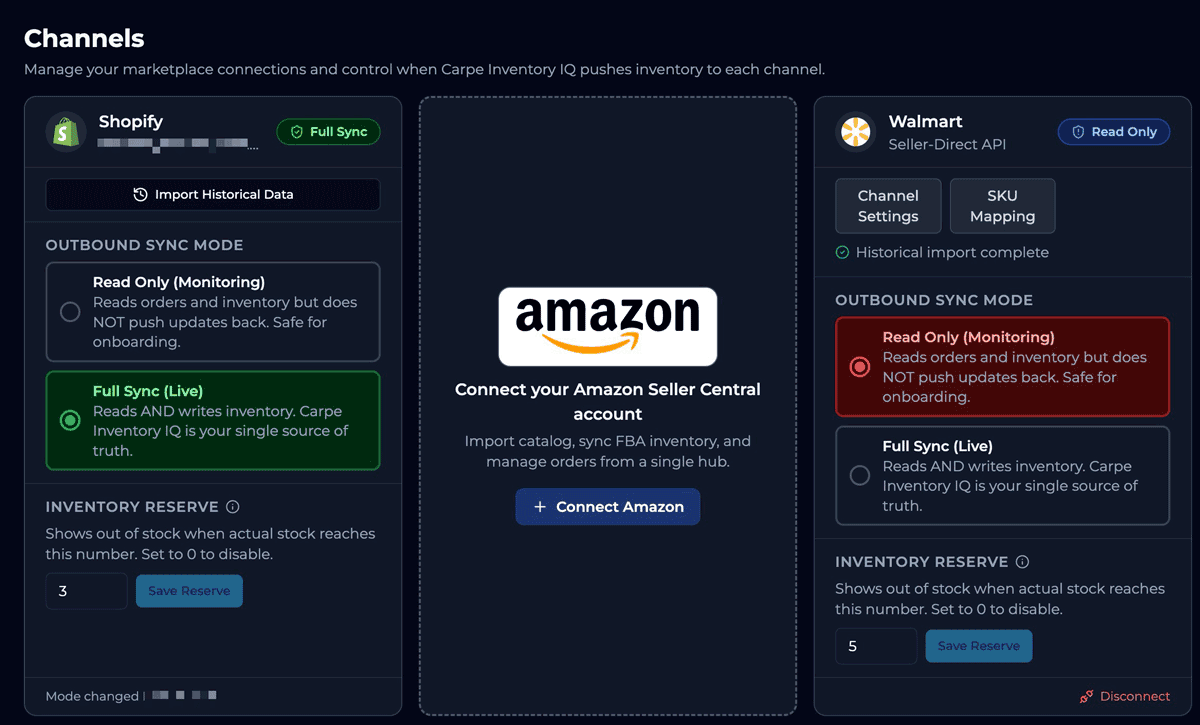
Inventory Reserve is configured per marketplace. Set Amazon to 5, Shopify to 2, and Walmart to 3. Each channel gets exactly the protection it needs.
Even on Shopify alone, a small reserve protects you from shipping a unit that turns out to be damaged or not in perfect condition on the shelf.
How much reserve do you need?
Think of it as automated safety stock management — calibrated per channel based on your sync cadence and order velocity. Here’s a starting point:
Low velocity (1–10 orders/day)
Shopify
1–2
BigCommerce
1–2
Amazon
2–3
Walmart
2–3
eBay
1–2
Medium velocity (10–50/day)
Shopify
2–3
BigCommerce
2–3
Amazon
3–5
Walmart
3–5
eBay
2–3
High velocity (50+ orders/day)
Shopify
3–5
BigCommerce
3–5
Amazon
5–10
Walmart
5–10
eBay
3–5
Running a sale or promotion?
Double your normal reserve temporarily.
All channels sync in near real-time. A reserve of 2–3 per channel protects against simultaneous cross-channel orders. You can always adjust.
Three layers of protection
Inventory Reserve is one part of a three-layer system that keeps your marketplaces safe:
Channel Sync Mode
Every marketplace connects in Read-Only first. Carpe Inventory IQ doesn’t push inventory until you explicitly enable Full Sync. One-click emergency stop if anything goes wrong.
Inventory Reserve
A configurable buffer per marketplace. Your marketplaces see zero before your real stock hits zero — protecting you from sync-gap overselling.
Dynamic Cloak™
Randomized inventory values prevent competitors from tracking your real stock levels. Cloak applies after Reserve — so your buffer is always maintained, and competitors see noise.
Actual Stock
340
Reserve: −5
335
Cloak: randomize
“28”
Amazon sees
28 units
The order matters: Sync Mode gates the connection → Reserve subtracts the buffer → Cloak randomizes the result. All three work together, and each one can be configured independently per marketplace.
When these three work together, overselling is a solved problem.
Inventory Reserve absorbs the sync gap.
No sync is instantaneous. Between the moment a sale happens and the moment every marketplace knows about it, there is always a gap. Reserve holds back a buffer of units so any orders that sneak through during that window get fulfilled — not cancelled, not oversold.
Dynamic Cloak randomizes what competitors see.
Competitors scrape your storefront to reverse-engineer your sales velocity. Cloak replaces the quantity your Reserve has already protected with a randomized value. Your buffer stays intact. What competitors see is noise, not signal.
Frequent sync keeps everything current.
Shopify and BigCommerce sync in near real-time via webhooks, and eBay via push notifications. Amazon and Walmart sync on a frequent polling schedule. The smaller the gap, the smaller the reserve you need. The system is designed to minimize exposure, not just patch it.
The result: overselling is a solved problem.
Not theoretically. Practically. Reserve catches sync gaps. Cloak protects your competitive position. Frequent sync shrinks the window. Together, they eliminate the scenarios that cause overselling — without requiring you to manually babysit your inventory across every channel.
Common questions about Inventory Reserve
Prevent overselling on Amazon. Prevent stockouts across Walmart.
One setting per channel. Connect in Read-Only. Configure your reserve. Go live when you’re confident. See how to switch safely.
30-day free trial · Inventory Reserve included in every plan
Included for every merchant. No add-ons, no upgrades required.
See pricing →