
Physical Inventory
Count inventory from your phone. No app required.
Full physical inventory or cycle counting — run either from any mobile browser. Scan UPC, FNSKU, and GTIN barcodes with your phone camera. Blind counts, auto-save, variance reports, and manager approval. Works on any phone. Included in every plan.
No app to download. No Play Store or App Store.
Open your phone’s browser, log in, and start counting. Works on iPhone, Android, tablets — anything with a browser.
No MDM concerns. No app store downloads. No version management. Hand a phone to a warehouse employee and they’re counting in 30 seconds.
Everything you need on one screen
- ✓Barcode scanning — tap the camera icon and scan any UPC, FNSKU, or GTIN barcode to jump to the right SKU
- ✓Search — find any SKU instantly by code, product name, or barcode
- ✓Quantity entry — tap, type, move on. Every entry auto-saves
- ✓Notes — add a note to any SKU for context (damaged, misplaced, etc.)
- ✓Bin locations — sort by bin code to walk the warehouse in pick order
- ✓Progress tracking — see how many SKUs are counted vs. remaining
- ✓Save draft or submit — pause and come back, or submit for manager review when done
How a count works — step by step
Start a count
Select a warehouse and optionally a zone or section.
Find your SKU
Search by SKU code or product name, or scan a barcode with your phone camera to jump straight to the right SKU.
Enter quantities
Blind count mode hides expected values so counters aren't biased.
Auto-save
Every entry saves immediately. Close your browser, come back later, pick up where you left off.
Submit for review
Manager reviews the variance report before adjustments post to the ledger.
Approve
Adjustments become ledger entries. Full audit trail.
Why blind counts matter
In a blind count, the counter doesn’t see the expected quantity — just a blank field. This prevents the natural bias of “the system says 47, so I’ll count to 47 and stop.”
Blind counts improve inventory accuracy by eliminating confirmation bias. Variance reports give you instant inventory reconciliation before any adjustments are committed. That discrepancy is the whole point of counting.
Blind Count Mode
Expected
●●●Counted
47Expected
●●●Counted
124Expected
●●●Counted
—Expected values hidden until count is submitted
Variance reports before anything changes
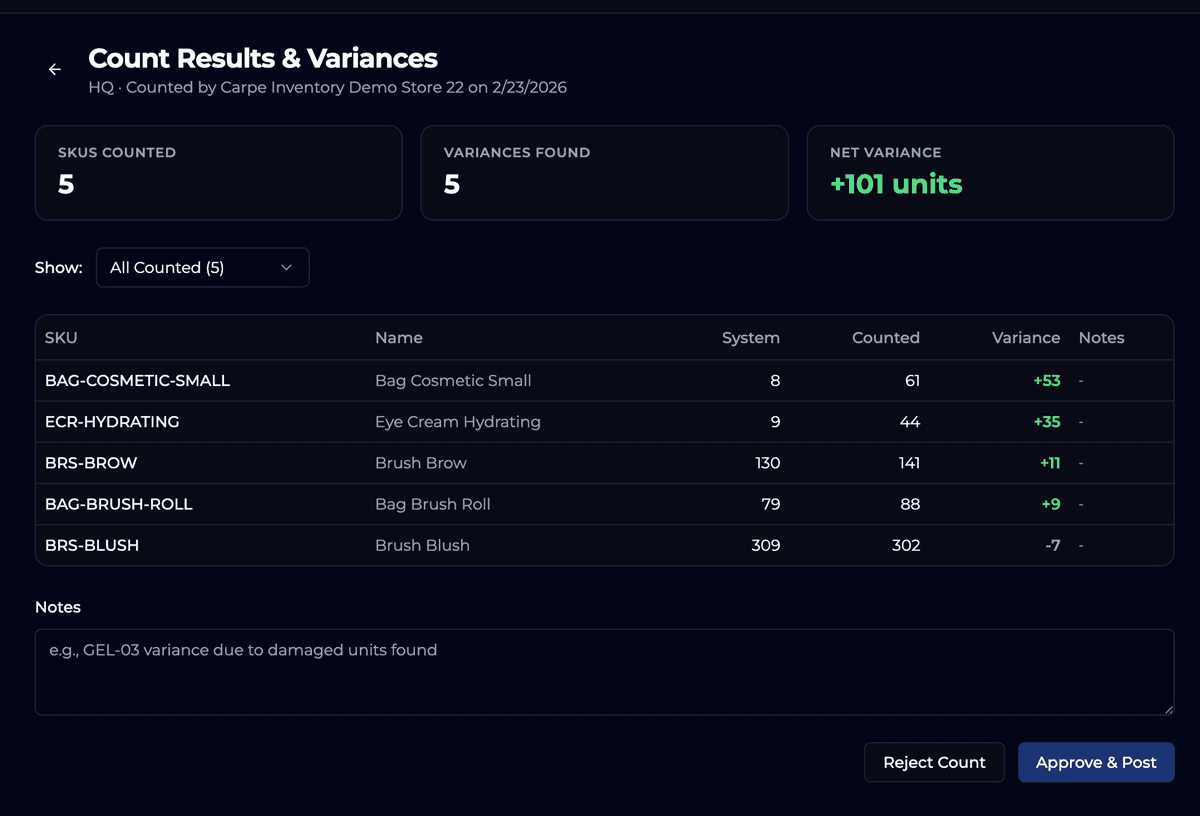
After counting, Carpe Inventory IQ generates a variance report comparing counted quantities to system quantities. Review discrepancies before posting adjustments. A manager can approve, reject, or request a recount — all from the same interface.
Built for real warehouses
Whether it’s a full warehouse stock count (AKA stock take) or a quick cycle count of one aisle, the same workflow handles both.
Scan barcodes with your camera
Tap the camera icon, point at a UPC, FNSKU, or GTIN barcode, and the right SKU is selected instantly. No handheld scanner required.
Works on any device
iPhone, Android, tablet. No app to install — just open a browser.
Bin (pick) locations
Assign bin codes to SKUs and sort your count in warehouse walk order. Enable per location in Settings.
Blind count mode
Hide expected quantities to prevent counting bias. Toggle on or off.
Auto-save everything
Every entry saves instantly. Close the browser, come back, pick up where you left off.
Manager approval
Variance reports require approval before adjustments post to the ledger.
Full audit trail
Every count, every adjustment, every approval. Timestamped and traceable.
Start your next count in 30 seconds.
Open your phone. Log in. Start counting. It’s that simple.
30-day free trial · Physical inventory included in every plan
Included for every merchant. No add-ons, no upgrades required.
See pricing →