
Connecting Marketplaces & Mapping SKUs
Everything you need to connect Amazon, Walmart, and eBay, understand marketplace identifiers, map your catalog, and import historical orders.
How multi-channel works in Carpe Inventory IQ
- Your storefront connects when you install Carpe Inventory IQ — Shopify merchants from the Shopify App Store, BigCommerce merchants from the BigCommerce App Marketplace. No extra setup needed.
- Amazon, Walmart, and eBay are connected separately from the Channels page.
- Every marketplace starts in Read-Only mode — nothing gets pushed until you say so.
- SKU mapping links each marketplace listing to your internal SKU so inventory stays in sync.
Before you connect
A few things to have ready before adding Amazon, Walmart, or eBay. Taking 10 minutes to prepare saves time during setup.
Import your storefront catalog first
Carpe Inventory IQ pulls your storefront products (Shopify or BigCommerce) during onboarding. Make sure that process is complete before connecting Amazon, Walmart, or eBay. Your storefront SKUs are the foundation — marketplace listings map to them.
Know your marketplace SKU codes
On Amazon, each listing has a Seller SKU (which you set) and an ASIN (which Amazon assigns). FBA and FBM listings can have different Seller SKUs for the same product. On Walmart, each listing has a SKU code (which you set), a WPID (which Walmart assigns), and usually a UPC or GTIN. On eBay, each listing has an Item ID (which eBay assigns) and a Custom Label (your SKU code) — Carpe Inventory IQ uses the Custom Label to auto-match to your internal SKU. Gather these before you start — you’ll need them for mapping.
Check if your SKU codes match across channels
If your Shopify SKU code is “WIDGET-001” and your Amazon Seller SKU is also “WIDGET-001,” Carpe Inventory IQ will auto-match them. If your codes are different across channels (this is very common), you’ll map them manually or via CSV after connecting.
Have your marketplace credentials ready
Amazon uses OAuth — you’ll sign in to Seller Central directly. No credentials to copy. Walmart requires API keys (Client ID and Client Secret) from the Walmart Developer Portal. Have those ready before you start. eBay uses OAuth — you’ll sign in to eBay directly. No credentials to copy.
Connecting your marketplaces
Each marketplace has its own connection method. Both take about 5 minutes to set up.

Amazon
- 1Go to Channels and click Add Amazon.
- 2You’ll be redirected to Amazon Seller Central to authorize the connection via OAuth.
- 3Sign in with your Amazon seller credentials and grant the requested permissions.
- 4You’ll be redirected back to Carpe Inventory IQ. The connection is active immediately.
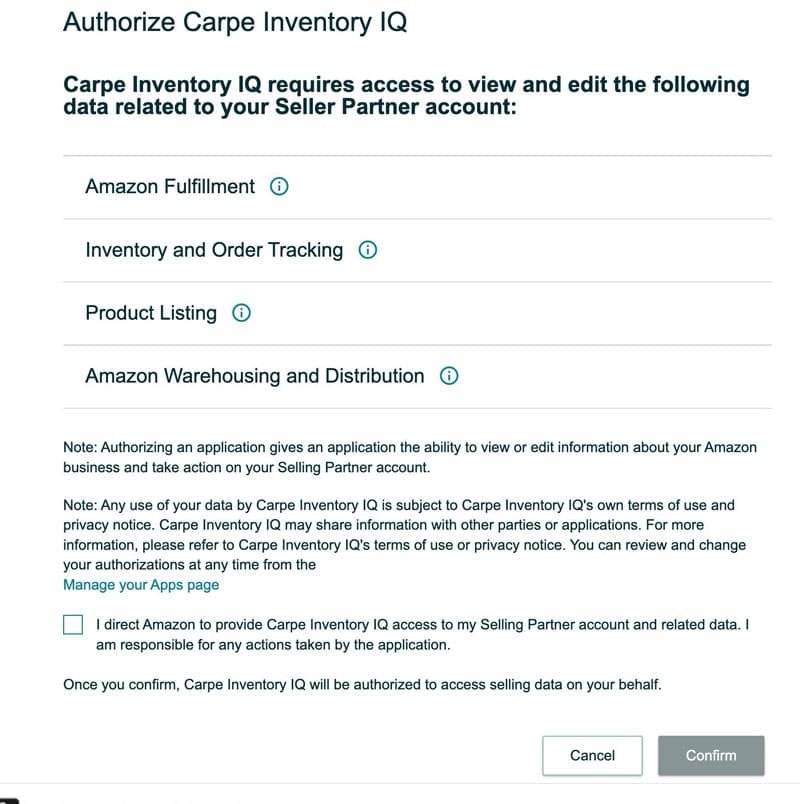
Amazon connects in Read-Only mode by default. Carpe Inventory IQ reads your orders and FBA/FBM inventory but doesn’t push anything back until you enable Full Sync.

Walmart
- 1Log in to the Walmart Developer Portal and click My Account in the upper right.
- 2Select your login type: Marketplace (US, Mexico, Canada & Chile) if you sell on seller.walmart.com, or Marketplace (Canada) if you sell on seller.walmart.ca.
- 3After logging in, find My API Keys and copy your Client ID and Client Secret.
- 4In Carpe Inventory IQ, go to Channels and click Add Walmart.
- 5Paste your Client ID and Client Secret. Click Test Connection to verify, then Connect.
Like Amazon, Walmart starts in Read-Only mode. You control when to enable Full Sync.
Store your Client Secret securely — Walmart only shows it once. Carpe Inventory IQ encrypts your credentials when stored.

eBay
- 1Go to Channels and click Add eBay.
- 2Sign in to eBay with your seller credentials and grant the requested permissions.
- 3You’ll be redirected back to Carpe Inventory IQ. The connection is active immediately.
eBay connects in Read-Only mode by default. Carpe Inventory IQ discovers your active listings via the eBay Active Inventory Report and decrements inventory as orders come in. Nothing is pushed back to eBay until you enable Full Sync. Carpe Inventory IQ never creates, edits, prices, or ends eBay listings — only available quantity is ever written.
Before you start, make sure you’re signed into the correct eBay seller account in your browser — or sign out of eBay first, so you can choose the right account when eBay asks you to authorize. If you’re already logged into a different eBay account, the connection will link that one.
Catalog review after connecting
After connecting Amazon, Walmart, or eBay, you’ll be taken to a catalog review page where the system matches your incoming products against your existing catalog. Most products auto-match by UPC barcode — you only need to review the exceptions. Each product gets a confidence score so you can focus your time where it matters.
After you connect: historical import
Once a marketplace is connected, Carpe Inventory IQ can import up to two years of historical order data. This gives you accurate sales velocity, demand forecasting, and reorder suggestions from day one — no waiting weeks to build up data.
How it works
- 1Go to Channels → select your marketplace → Import Historical Orders.
- 2Carpe Inventory IQ requests your order history from the marketplace in the background. You can close the tab — you don’t need to keep it open.
- 3The import typically takes 1–2 hours depending on your order volume. You’ll receive an email when it’s complete.
- 4Imported orders are matched to your internal SKUs using your SKU mappings. This is why mapping should be done first.
Set up SKU mapping before importing. The import uses your mappings to link each marketplace order to the correct internal SKU. If you import first and map later, you can re-run the import safely — it won’t create duplicate records — but it’s faster to do it in the right order.
Safe to re-run. Already-imported orders are automatically skipped. You can re-run the import after adding new mappings without worrying about duplicate data.
Understanding marketplace aliases
Each marketplace has its own set of product identifiers. Understanding how they relate to your internal SKUs helps make the mapping process faster and less confusing.
Amazon identifiers
A single product on Amazon can have multiple identifiers:
Seller SKUThe SKU code you assigned when listing the product. This is what Carpe Inventory IQ uses for auto-matching. You can have different Seller SKUs for FBM and FBA listings of the same product.
ASINAmazon’s unique product identifier (e.g., B08N5WRWNW). Assigned by Amazon — you don’t control it. Used as a secondary matching signal.
FBM vs FBAFulfilled by Merchant (FBM) and Fulfilled by Amazon (FBA) are separate channels, even for the same product. Each gets its own alias in Carpe Inventory IQ because they have different inventory pools and fulfillment costs.
If you sell on both FBA and FBM, you may see what looks like the same product listed twice on the mapping page. This is expected — each needs to be mapped to the same internal SKU so Carpe Inventory IQ can track total demand across both fulfillment methods.
Walmart identifiers
Walmart product identifiers work similarly:
SKUThe SKU code you assigned when listing the product. This is the primary identifier Carpe Inventory IQ uses for matching.
WPIDWalmart’s internal product identifier. Assigned by Walmart — you don’t control it. Similar to Amazon’s ASIN.
UPC / GTINUniversal Product Code or Global Trade Item Number. Walmart often requires UPCs for listing. Carpe Inventory IQ uses this as a strong matching signal — if your internal SKU has the same UPC, they’ll auto-match.
WFSWalmart Fulfillment Services — Walmart’s equivalent of Amazon FBA. If you use WFS, enable it on the Walmart channel settings page to track WFS inventory levels (available, inbound, and reserved) separately.
How auto-matching works
When you import your marketplace catalog, Carpe Inventory IQ tries to automatically match each listing to an internal SKU:
- Amazon: Matches by Seller SKU → internal SKU Code first, then by ASIN.
- Walmart: Matches by UPC/GTIN first (strongest signal), then by SKU Code.
Products that don’t auto-match appear in the unmapped section. You can map them one at a time using inline search, or in bulk via CSV upload.
Mapping marketplace SKUs
Once a channel is connected, you need to tell Carpe Inventory IQ which marketplace listing corresponds to which internal SKU. This is called SKU mapping. Each channel has its own mapping page.
Import your marketplace catalog
Go to Channels → select your marketplace → Mapping. Click “Import Catalog” (or “Check for New Products” if you’ve imported before). This pulls all your marketplace listings into Carpe Inventory IQ and auto-matches any that share the same SKU code as your internal catalog.
Auto-matching is exact — if your marketplace SKU is “WIDGET-001” and you have an internal SKU “WIDGET-001”, they’ll link automatically.
Review auto-matched SKUs
After import, you’ll see a summary: total products, how many were auto-matched, and how many need manual mapping. Review the auto-matched ones to make sure they’re correct. You can unmap any incorrect matches.
Map remaining SKUs manually or via CSV
For SKUs that didn’t auto-match, you have two options. You can map them one at a time using the inline search on the mapping page — just type your internal SKU code and select the match. Or you can map them in bulk via CSV: export unmapped products, fill in the internal SKU Code column, and re-import.
Verify your mappings
Once all SKUs show a mapped status, your marketplace is ready. When orders come in from that channel, Carpe Inventory IQ knows exactly which internal SKU was sold and adjusts inventory across all channels accordingly.
CSV import reference
Each mapping page supports bulk import via CSV. Download the template from the mapping page, fill in the columns, and upload. The importer is flexible with column names — for example, “Walmart SKU,” “Seller SKU,” and “Channel SKU” all map to the same field.
| Column | Required | Description |
|---|---|---|
SKU Code | Yes | Your internal SKU code in Carpe Inventory IQ |
Walmart SKU | Yes | The seller SKU on Walmart (column name varies by channel) |
GTIN | Optional | UPC or GTIN barcode (optional, used for reference) |
The CSV template is channel-specific. Download it from each channel’s mapping page to get the correct column headers. Amazon uses “Amazon SKU” and “ASIN” instead of “Walmart SKU” and “GTIN.”
Frequently asked questions
Ready to get started? Sign up and try it free for 30 days.